Fix Synology File Station on iOS Devices When the Certificate Is Reported as Invalid
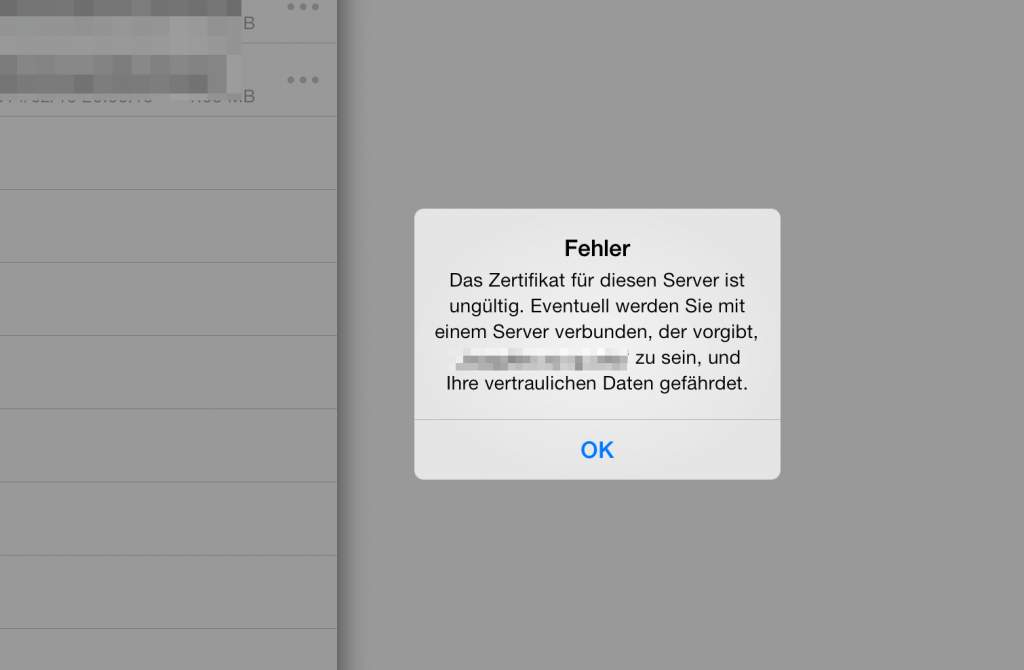
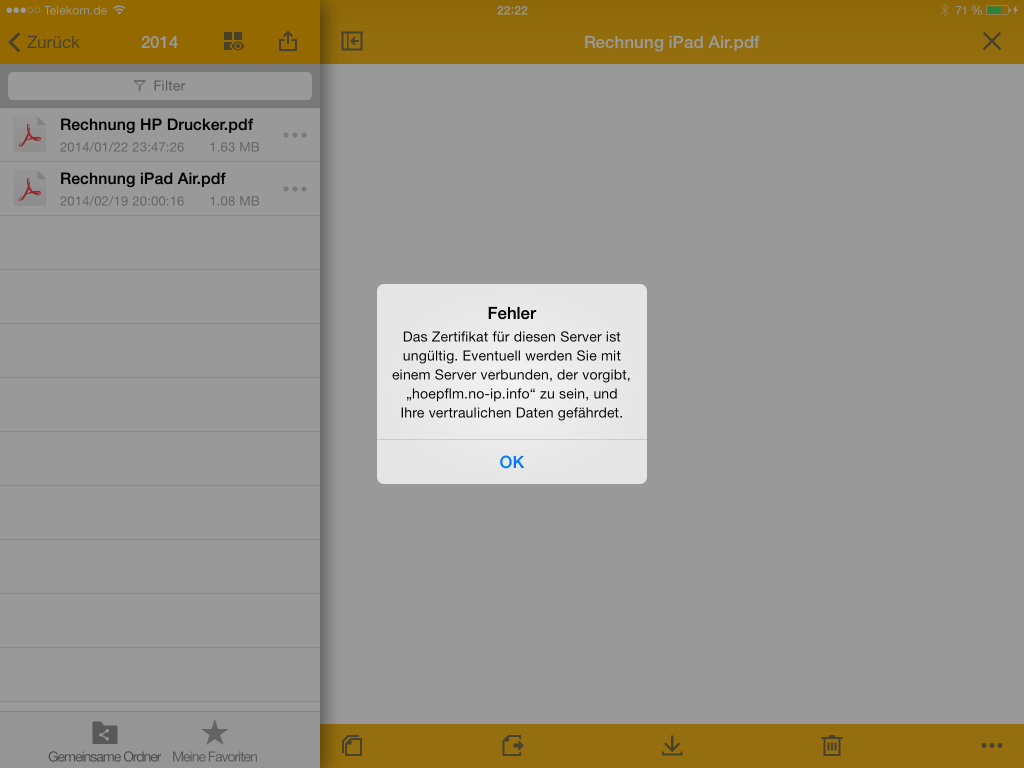
This is what the problem looks like. You can log in to the DiskStation using DS File, but when you try to open a file you get the message: “The certificate for this server is invalid. You might be connecting to a server that is pretending to be XXXXXX, which could put your confidential information at risk.”
After Synology’s latest update wave to DSM 4.3 and the new iOS versions of the Apple apps, I could only access the File Station app without HTTPS. I was/am not alone with this problem; several users describe the same issue on synology-forum.de. It may not actually be a bug at all. Previously, it was apparently possible to access File Station via a dynamic DNS address even if the HTTPS certificate had not been issued for that DynDNS address. This has now changed with the new version. In addition, the certificate created on the Synology must now also be imported onto the iOS device. That worked for me, and HTTPS access is working again. The following image gallery shows the individual steps.
At the time of the fix, my DS213+ was running DSM 4.3-3827 and the iOS devices were running DS File 5.0-138.
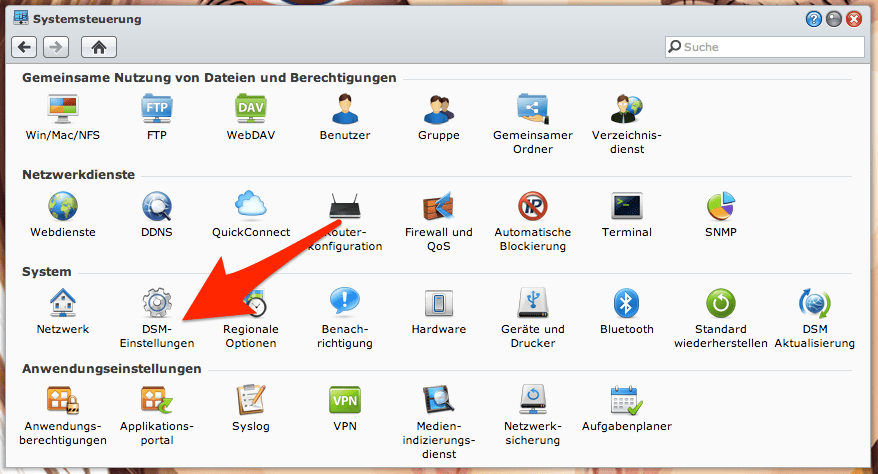
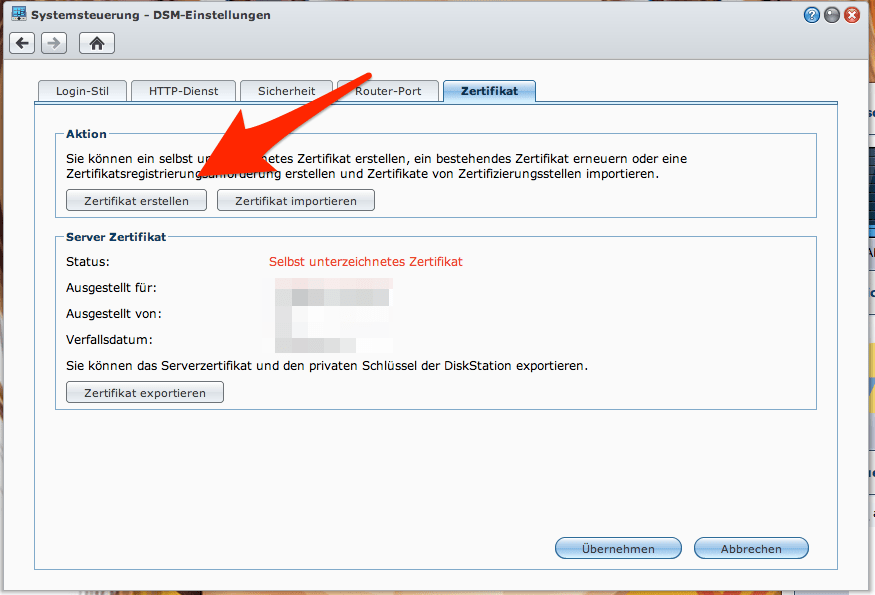
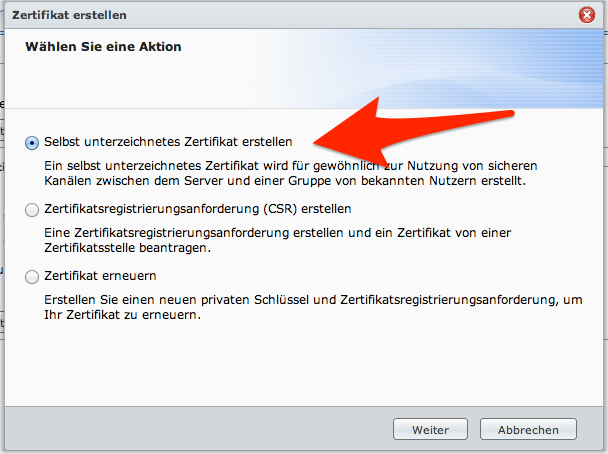
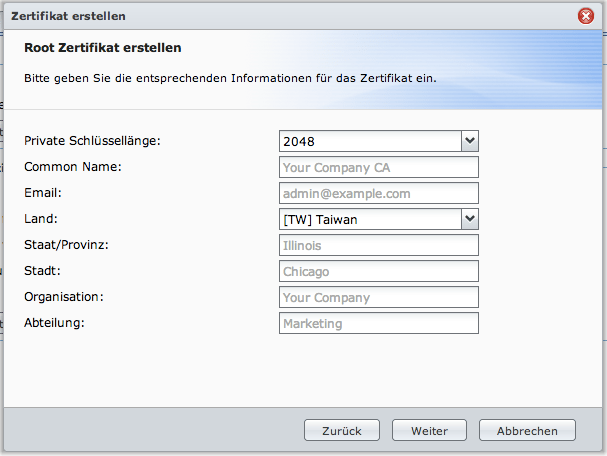
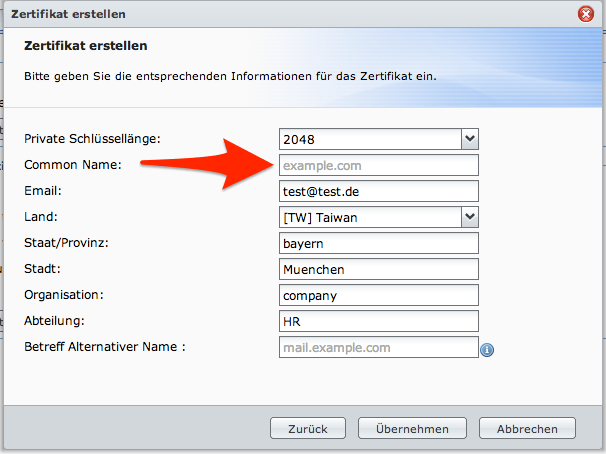
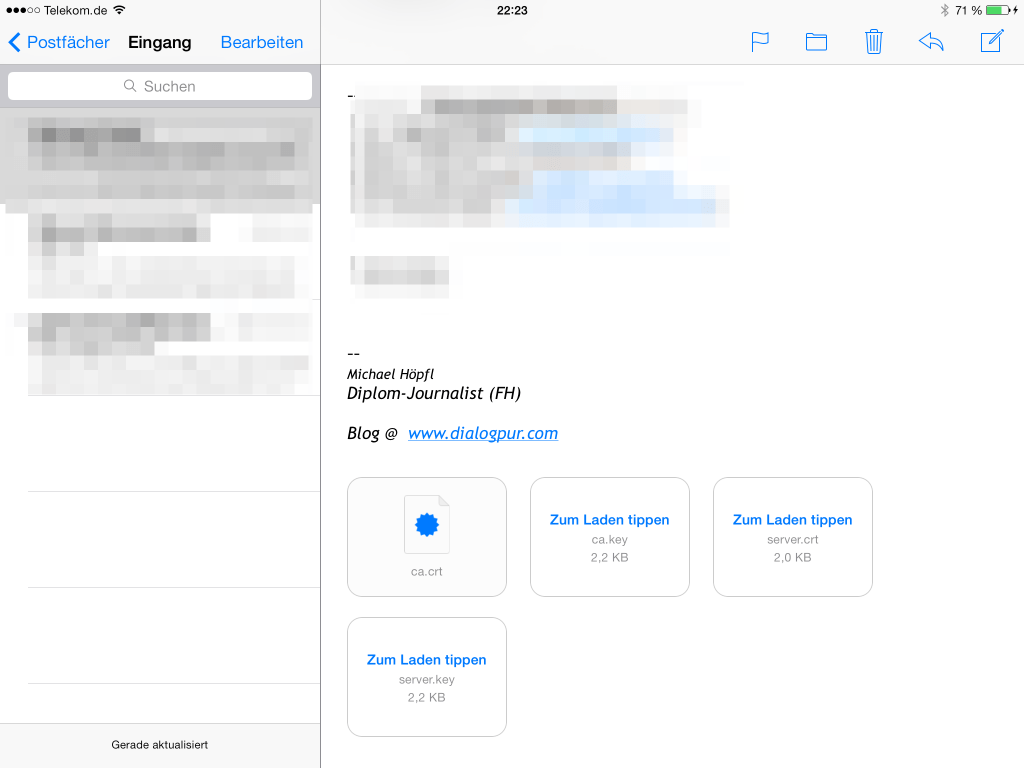
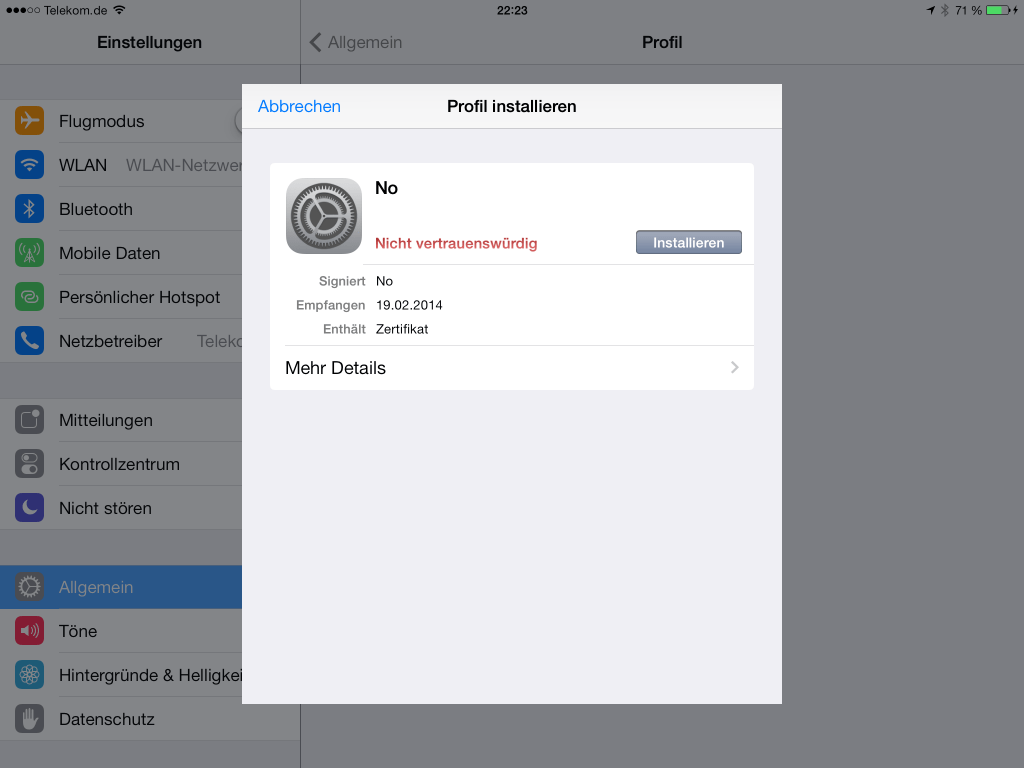
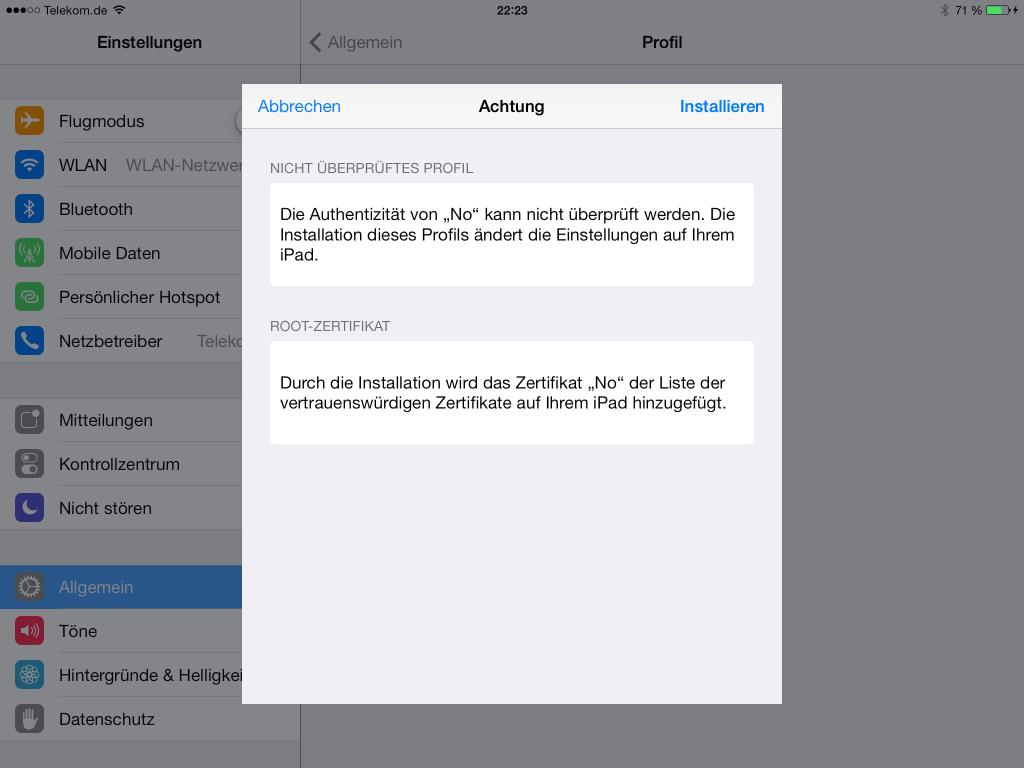
1. This is what the problem looks like. You can log in to the DiskStation using DS File, but when you try to open a file you get the message: “The certificate for this server is invalid. You might be connecting to a server that is pretending to be XXXXXX, which could put your confidential information at risk.”2. What fixed the problem for me was creating a new certificate. To do this, open Control Panel in the DiskStation admin area and then go to the DSM settings.3. In the DSM settings, open the “Certificate” tab and select “Create Certificate”.4. On the next screen, select “Create self-signed certificate”.5. In the following dialog, all fields must be completed. You can, however, enter placeholder values. The important thing is to choose the longest possible key length.6. This dialog differs only slightly from the previous one, but it is essential. Under “Common Name”, enter the address at which the DiskStation can be reached from the internet – either a fixed IP address or the dynamic DNS address without www or http. If you enter an internal IP address (such as 192.168.0.1), you will only be able to access the data via the app from the internal network. If several addresses route to the DiskStation, they can be entered under “Subject Alternative Name”.7. The certificate has now been created and can be downloaded under DSM Settings → “Certificate”. This creates a ZIP file, which must be extracted. It contains a file called “ca.crt”. Email this file to the iOS device and open it in Apple’s Mail app.8. You are almost done. Tap Install in this dialog.9. After tapping Install once more, access to the DiskStation via DS File and HTTPS should work properly again.
Ich schreibe und poste hier zu Themen, die mich seit jeher privat als auch beruflich interessieren und begleiten. [Mehr über mich]
5 thoughts on “Fix Synology File Station on iOS Devices When the Certificate Is Reported as Invalid”
You made my day. Ich wollte jetzt ein verifiziertes SSL-Zertifikat mit eigenem DDNS von eigener Domain nutzen, denn dann akzeptiert DS File die Verbindung, musste aber feststellen, dass außer den bekannten Anbietern in DSM nicht eigetragen werden können. D.h. mit neuer IP funktioniert das dann nicht mehr. So ist es die schlankste Lösung.
freut mich wenn, ich helfen konnte. VG!
Der Beitrag ist zwar schon etwas älter, aber auch mit aktuellen DSM und iOS app trat der Fehler noch auf ….. dank dieser Anleitung kann ich meine Daten in der DSfile app auf dem iPad wieder laden/ansehen.
Vielen Dank.
Danke, fürs Feedback. Wundert mich auch, dass das immer noch vereinzelt notwendig ist. Aber dann hat sich die Mühe beim Schreiben wenigstens gelohnt. VG!
Perfekt! Exakt das, was ich brauchte. Ich konnte über die Apps von Synology auf Fotos, Musik und Videos zugreifen. Nur beim DS-Manager kam die Fehlermeldung wegen fehlenden Zertifikats; sogar im Heimnetz. Dank Ihrer Anleitung hat es geklappt. Ganz herzlichen Dank!
Um dir ein optimales Nutzungserlebnis zu bieten, verwendet diese Website Technologien wie Cookies, um Informationen auf deinem Gerät zu speichern und/oder darauf zuzugreifen. Mit deiner Zustimmung können dabei Daten wie das Surfverhalten oder eindeutige IDs verarbeitet werden. Wenn du deine Einwilligung nicht erteilst oder später zurückziehst, können einzelne Funktionen der Website eingeschränkt sein.
Funktional
Always active
Die Speicherung oder der Zugriff ist technisch erforderlich, damit ausdrücklich gewünschte Dienste und grundlegende Funktionen dieser Website bereitgestellt oder Nachrichten über ein elektronisches Kommunikationsnetz übertragen werden können.
Präferenzen
Die Speicherung oder der Zugriff dient dazu, Einstellungen und Präferenzen zu speichern, die für die Nutzung der Website hilfreich sind, aber nicht ausdrücklich angefordert wurden.
Statistiken
Die statistische Auswertung hilft dabei, die Nutzung dieser Website besser zu verstehen und Inhalte sowie Funktionen zu verbessern. Die Analyse erfolgt mit Matomo ohne den Einsatz von Tracking-Cookies.Die technische Speicherung oder der Zugriff, der ausschließlich zu anonymen statistischen Zwecken verwendet wird. Ohne eine Vorladung, die freiwillige Zustimmung deines Internetdienstanbieters oder zusätzliche Aufzeichnungen von Dritten können die zu diesem Zweck gespeicherten oder abgerufenen Informationen allein in der Regel nicht dazu verwendet werden, dich zu identifizieren.
Marketing
Die Speicherung oder der Zugriff wird verwendet, um Nutzerprofile zu erstellen, personalisierte Werbung anzuzeigen oder das Nutzungsverhalten auf dieser oder über mehrere Websites hinweg für Marketingzwecke zu verfolgen.
Um dir ein optimales Erlebnis zu bieten, verwenden wir Technologien wie Cookies, um Geräteinformationen zu speichern und/oder darauf zuzugreifen. Wenn du diesen Technologien zustimmst, können wir Daten wie das Surfverhalten oder eindeutige IDs auf dieser Website verarbeiten. Wenn du deine Einwilligung nicht erteilst oder zurückziehst, können bestimmte Merkmale und Funktionen beeinträchtigt werden.
Funktional
Always active
Die Speicherung oder der Zugriff ist technisch erforderlich, damit ausdrücklich gewünschte Dienste und grundlegende Funktionen dieser Website bereitgestellt oder Nachrichten über ein elektronisches Kommunikationsnetz übertragen werden können.
Präferenzen
Die Speicherung oder der Zugriff dient dazu, Einstellungen und Präferenzen zu speichern, die für die Nutzung der Website hilfreich sind, aber nicht ausdrücklich angefordert wurden.
Statistiken
Die statistische Auswertung hilft dabei, die Nutzung dieser Website besser zu verstehen und Inhalte sowie Funktionen zu verbessern. Die Analyse erfolgt mit Matomo ohne den Einsatz von Tracking-Cookies.Die technische Speicherung oder der Zugriff, der ausschließlich zu anonymen statistischen Zwecken verwendet wird. Ohne eine Vorladung, die freiwillige Zustimmung deines Internetdienstanbieters oder zusätzliche Aufzeichnungen von Dritten können die zu diesem Zweck gespeicherten oder abgerufenen Informationen allein in der Regel nicht dazu verwendet werden, dich zu identifizieren.
Marketing
Die Speicherung oder der Zugriff wird verwendet, um Nutzerprofile zu erstellen, personalisierte Werbung anzuzeigen oder das Nutzungsverhalten auf dieser oder über mehrere Websites hinweg für Marketingzwecke zu verfolgen.





You made my day. Ich wollte jetzt ein verifiziertes SSL-Zertifikat mit eigenem DDNS von eigener Domain nutzen, denn dann akzeptiert DS File die Verbindung, musste aber feststellen, dass außer den bekannten Anbietern in DSM nicht eigetragen werden können. D.h. mit neuer IP funktioniert das dann nicht mehr. So ist es die schlankste Lösung.
freut mich wenn, ich helfen konnte. VG!
Der Beitrag ist zwar schon etwas älter, aber auch mit aktuellen DSM und iOS app trat der Fehler noch auf ….. dank dieser Anleitung kann ich meine Daten in der DSfile app auf dem iPad wieder laden/ansehen.
Vielen Dank.
Danke, fürs Feedback. Wundert mich auch, dass das immer noch vereinzelt notwendig ist. Aber dann hat sich die Mühe beim Schreiben wenigstens gelohnt. VG!
Perfekt! Exakt das, was ich brauchte. Ich konnte über die Apps von Synology auf Fotos, Musik und Videos zugreifen. Nur beim DS-Manager kam die Fehlermeldung wegen fehlenden Zertifikats; sogar im Heimnetz. Dank Ihrer Anleitung hat es geklappt. Ganz herzlichen Dank!